468x60 Ads

Lorem ipsum dolor sit amet, consectetur adipisicing elit, sed do eiusmod tempor incididunt ut labore et dolore magna aliqua. Ut enim ad minim veniam, quis nostrud exercitation test link ullamco laboris nisi ut aliquip ex ea commodo consequat.
Showing posts with label Blogging. Show all posts

Saturday, December 1, 2012

7 More Habits of Highly Successful Bloggers


success-habits-2In the last blogging success habits post, I shared 7 habits that you could incorporate into your daily life to improve your blogging efforts.
Today… I have 7 more. Why?
Simply because it takes a lot to be successful. A lot of hard work. A lot of persistence.
So, it’s only natural that it would take more than 7 success habits to build a successful blog.
Plus, maybe these habits resonate with you more than the last 7, so you can start applying them to your life. Hope you enjoy it…

7 More Habits of Highly Successful Bloggers

1. They Master Their Topic
Successful bloggers study their topic day and night. They read about it. Listen to podcasts. Do their research and apply what they learn so that the knowledge sinks in.
Mastering is not just about learning the skills. It’s about understanding and the real-life implementation of that understanding. So if you want to be successful, master your topic.
You’ll be surprised how far you can get.
2. Create Epic Content
Without great content, your blog will be just another domain with a wordpress installation. Great content is required if you want to have a chance online, but it will only get you through the front door.
Epic content is what’s going to set you apart from the rest. Epic content are the articles, podcast episodes, videos and PDF’s that take you hours to put together.
They’re the resources your audience can come back to again and again for a refresher. This content is evergreen and will be relevant months and even years down the road.
If you want to successfully attract a large group of people who will buy from you, then improve your writing and start creating amazing stuff.
3. They Are Creative – Sometimes…
Being creative has it’s pros and cons. On one side creativity sets you apart. Creativity is a sense of originality and uniqueness, and can be great in a world full of “me-too” bloggers.
However, creativity can also be your worst enemy. The desire to be unique can stop you in your tracks. You’ll constantly need to find new ideas that haven’t been blogged about. You’ll get writer’s block and that, my friend, really sucks.
The best way to be creative is to model what works, and put your own spin to it. List posts are great (and overdone, sure..) But there are a lot of ways to write a list post. Find your own way and get it done.
4. They’re Great At Managing Time
Successful bloggers don’t spend hours on Facebook and Twitter, fooling themselves that they’re actually getting work done. We (and I mean us humans) tend to find ways to get away from the real work.
The work that’s going to get us real results. We find “valid” excuses to try to justify why we take certain actions. Successful bloggers know when they’re bullshitting themselves, and get back to work.
5. They Use Multi-Channel Marketing
The idea of being everywhere is a sexy one. Imagine getting visitors from Google, YouTube, iTunes, Facebook, Twitter, Pinterest, as well as 10 to 15 other blogs on a daily basis.
Sure it sounds great, but it’s not the easiest thing to do. Creating assets on all of these platforms takes time and dedication, and successful bloggers understand that.
6. They Inject Personality Into Their Work
This is one thing I highly recommend you do. It’s probably the easiest and best way to set yourself apart from all of the other bloggers in your industry. Inject personality in your articles.
I enjoy reading blogs where the author writes as if he’s (or she’s) speaking to me in person, one on one.. having a beer. That’s the type of content that resonates the most with people.
Of course, you don’t want to have a ton of grammar errors, ‘cuz that can get annoying. (I’ve made a lot of errors, don’t obsess over it)  But think about the blogs you enjoy reading the most.. how do they write?
7. They Just ‘Get To Work’
…and last but certainly not least – successful bloggers don’t screw around. The hundreds of articles on their sites, all of those videos and podcast episodes did NOT just show up overnight by wishing upon a star.
These people put in work day in and day out. They just got to work – and now it’s your turn to get it done.

Are you having success? Share your habits below..

7 Habits of Highly Successful Bloggers


highly-successful-bloggers“Some people dream of great accomplishments, while others stay awake and make them happen.”

It’s true. Some people are dreamers, and others are action tackers.
It’s true that we’re all different, but there are certain habits we can incorporate into our daily lives that can help us become better. …become better people, better readers, better writers and in this case, better bloggers.
Below are seven (7) habits that highly successful bloggers have incorporated into their lives and their work online. Take a look and see how many of these you can start incorporating into yours.

7 Habits of Highly Successful Bloggers

1. Understand The Needs of the Market
Bloggers have a higher chance of creating a successful website when they’re in tune with the needs of the people they are trying to serve. Remember that we are in the business of solving problems (and making money, too) – But, in order to make the money we want to make, we need to figure out how to make other people’s lives better.
The fastest way to get there is by understanding your market’s fears and frustrations, and creating content that helps them alleviate that pain.
2. Proofread Their Content
Successful bloggers take their content creation process seriously. They don’t like publishing crappy articles for the sake of adding content to their site.
They understand that there are real people reading the words they write. They understand that NOT proofreading their content could mean the difference between a home run piece of work, and just another post.
Think about that…
3. They Read… A Lot
Reading sparks ideas. Reading gets your mind going. If you’re stuck on what to write about next, I recommend grabbing anything to read:
  • a fiction novel
  • an industry blog
  • a celebrity gossip magazine
  • this blog :0)
Grab something and start reading.
4. Focus on Goals & Objectives
Successful bloggers focus on goals and objectives. They don’t linger with things that don’t matter much, like:
  • how many friends they have on Facebook
  • how many followers they have on Twitter
  • whether or not they should use pop ups
Successful bloggers make decisions quickly based on their goals. They don’t dwell on their past failures, and they keep moving forward no matter what.
5. Write For People… Not Search Engines
Search engines are important. I understand that. I get over 7,000 visits per month from Google alone and I love it. But the reason I’m getting these visits is not because of some secret SEO technique  or special plugin. The reason those visits are coming in is simply because I wrote those articles for human beings.
I wrote content that people could easily understand and consume. There’s no need to stuff your articles with keywords anymore. That kind of behavior is frowned upon. So write for people; you’ll get way better results that way.
6. Keep Track of Stats
Successful bloggers keep track of their statistics. They know what to look for and which statistics matter.
They try to figure out why a certain post got hundreds of retweets, while another post only received a few. They’re focused on the stats they can read and gather valuable information from, so that they can try to recreate that success.
7. But Don’t Obsess Over Stats
Obsessing over stats is also a bad habit and successful bloggers don’t do it. Once they’ve gathered the information they need, they move on to the next task on their list.
They understand that staring at their Google Analytics account is a waste of time – and very addictive.

What Success Habits Do You Have?

share them below… and then share this post with someone you think might benefit.

Tuesday, November 27, 2012

Blogspot SEO Guide: How to Tweak your Search Preferences Settings

Earlier this week, Blogger announced what is probably the most awaited feature that made me move to WordPress late last year. WordPress has lots of SEO plugins and it was quite an edge over blogger as I mentioned on this post but this new feature addresses that to some extent. Blogger now has a SEO settings right in the dashboard and lots of blogspot users don’t even know how to go about this. With the whole thing done wrong, your blog can disappear from google search without you knowing it. It should be noted that you can’t toy around with these settings unless you know exactly what you’re doing. The following features can be found in the new SEO preferences:
  • Description meta tag
  • Custom 404 page
  • Custom redirects (Redirect 404 pages to any page on your blog).
  • Custom robots.txt
  • Custom Robots header tags
  • No follow tag, open link in new tab
How to Activate Blogger Advanced SEO Settings
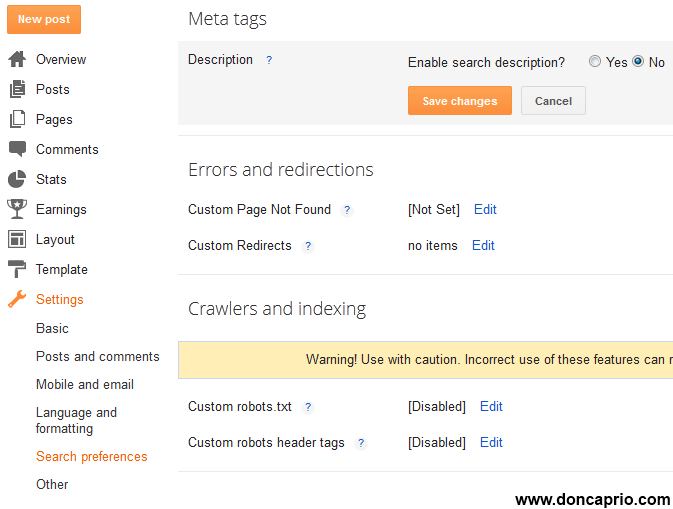
As mentioned earlier, doing this the wrong way can remove your site from google search and I suggest you go through this post careful unless you know exactly what this SEO search preferences mean. To Enable them, go to Settings > Search Preferences
blogger seo preferences
Now let’s take a look into these settings one after the other so as to know how to use them.
1. Description Meta Tag
Description meta tag does only one thing: It gives potential visitors an overview of what your blog is all about on search engine result page (SERP).
As shown in the image below, that is exactly how meta description makes your site appears on google search.
blogger search preferences settingsYou should, however, keep two things in mind when writing your meta description:
1. It shouldn’t be more than 150 characters because this is what most search engines use and if it exceeds the limit, the rest may be cut off.
2. For search engine optimization, you should include your most important keywords in the meta description.
3. This is just for the homepage and not the entire blog, OK?
Meta Description for Individual Posts
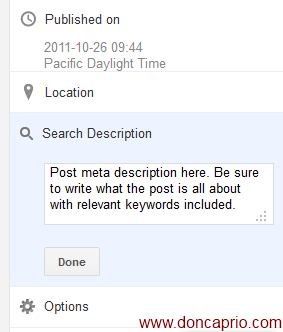
In the past, you need to edit your template to use unique meta description for individual blog posts but it’s a lot different now. By activating meta description from your search preferences as explained above, you automatically get the option to add meta description to your blog posts from the post editor.
meta description for individual blog posts blogspotThis description should also contain the most relevant keyword in the post and shouldn’t exceed 150 characters. I think the maximum limit is 160 though.
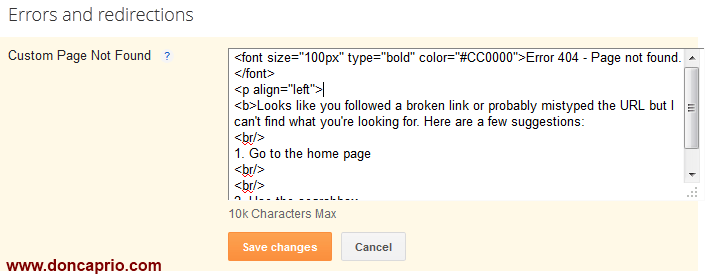
2. Custom 404 Page
This is useful when visitors land on a page that no longer exists, followed a broken link or mistyped a URL.
blogger search preferences - custom error 404 page
You can simply copy the code below and paste it in the appropriate box to set up your own Error 404 page
<font size=”100px” type=”bold” color=”#CC0000″>Error 404 – Page not found.</font>
<p align=”left”>
<b>Looks like you followed a broken link or probably mistyped the URL but I can’t find what you’re looking for. Here are a few suggestions:
<br/>
1. Go to the home page
<br/>
<br/>
2. Use the searchbox
</b></p>
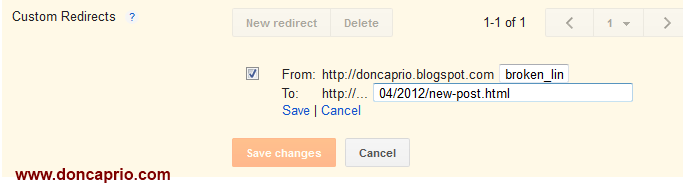
3. Custom Redirects
If you’ve written an old post and wish to redirect to a newly updated one that’s more detailed, this comes in handy. It can also be used to correct some permalinks linked from other sites that were mistyped. You can detect these from Google Webmaster Tools.
blogger search preferences settings - custom redirect4. Custom Robots.txt
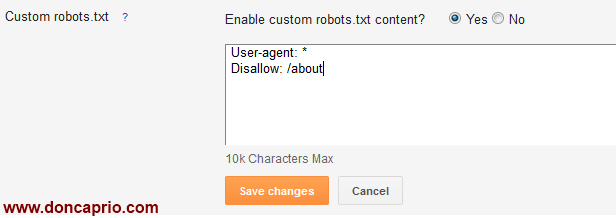
If you’re new to all these SEO terms, you may be wondering what robots.txt means. Robots.txt is just a simple text file place at the root of your domain that tells search engines how to index your site, where to crawl and where not to crawl. As you can see, using the wrong robots.txt can remove your index from google search which happens to be your largest source of traffic.
blogger SEO - robots.txt
To exclude certain content from being searched, go to Settings > Search Preferences and click Edit next to “Custom robots.txt.” Enter the content which you would like web robots to ignore. For example:
User-agent: *
Disallow: /about
For a better understanding of what robots.txt does, you can watch this video by Matt Cutts. It gives you an insight in the basics.


You should only use this feature if you’re absolutely sure of what you’re doing. I suggest you should leave it the way it is unless you wish to remove certain pages from search results.
5. Custom Robots header tags
This is also used to control how search bots crawl and index your blog and should also be carefully used. Whatever settings you make here should be seen in your blog’s head section and will determine search engines behavior. It looks a lot complex but this table should explain what most of these terms mean:  Copied

New Facebook Comment Box for Blogger With Notifications Enabled

Facebook comment for your blog can serve as a good way to make your site more engaging and encourage readers to drop comments if they’re already logged in to Facebook. It also serves as a source of traffic since using Facebook comment shares the comment and post page on the visitor’s Facebook wall. One thing should be noted though: Facebook comment has no SEO value since it’s being displayed in an iframe which Google won’t index. Comments made with the regular comment box on your site has more advantages especially if you get loads of comment, more keywords you didn’t actually mention in the post content but appearing in comments do bring more search engine traffic. This is something Facebook comment lacks, execept the extra traffic you get from Facebook.
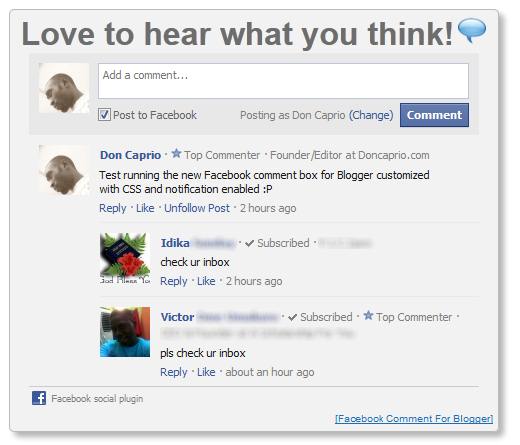
I just thought you should know that before you implent it on your blog. As you can see, I do use it too. I wrote a post on this particular topic earlier but Facebook has changed since, lots of things on the post may not look exactly as explained. Also, this one has a feature the previous one didn’t have – getting notified of every comment made on your blog. One other thing, I customized this with a little CSS. Below is a screenshot of what it looks like:
new facebook comment box for blogger with notification
You may also check the live demo on my old blog here.

How to add Facebook comment box to Blogspot

There are about five steps to get this done but chill out, it’s easy, ok? :D Just follow the steps and you’ll have a nice Facebook comment box installed on your blog in no time.
1. Creating a Facebook Application

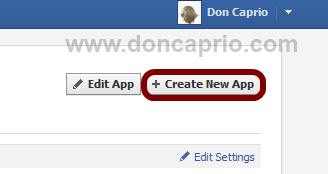
i. Head on to facebook developer page, you should create a new app by clicking the button at the top right.
how to add facebook comment box for blogger
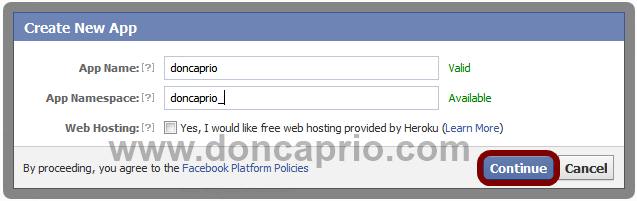
ii. Enter your application name and namespace,input the captcha code and proceed.
how to add facebook comment to blogger
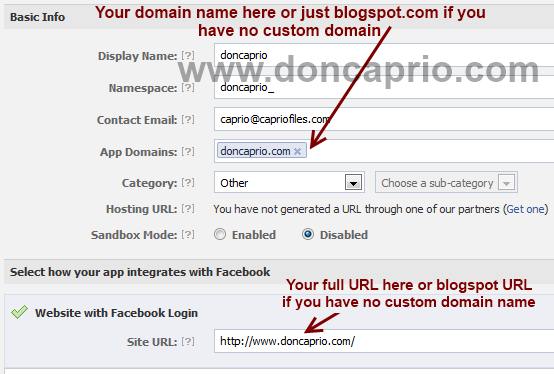
iii. On the next page, enter your custom domain name (if you’re using a custom domain) or just blogspot.com (if you’re using blogspot sub domain) in the space provided for App domain.
For App website, enter you blog URL. ( http://www.xyz.com/ or http://xyz.blogspot.com/ ). Be sure it starts with http:// and ends with / as shown in the screenshot below:
how to add facebook comment to blogspot
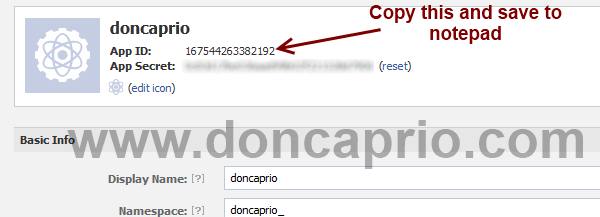
iv. Scroll down a bit and hit the Save Changes button. Now you’re done with creating your facebook application but there’s one more thing to do. On that same page, you should see your application ID. Copy it and save somewhere, you’re gonna be needing it.
facebook comment box for blogspot
Now let’s head to your blog and finish this up ;)

2. Adding the codes to your template

We’re adding four sets of codes into your template to make this work the way we want, aight?
i. xmnls attribute
ii. SDK script
iiI. Open graph meta tag
iv. Comment form iframe code
Log in to your blogger account and click on Template > Edit HTML > Check Expand Widget Template
i. Press Ctrl + F and search for this code:


<html

This should be found on the second or third line of your template.
- Right in front of this, add the following code:
xmlns:fb='http://www.facebook.com/2008/fbml'

-Be sure to have a space before and after this code. Take a look at the example below:

<html xmlns:fb='http://www.facebook.com/2008/fbml' expr:dir='data:blog…………..2005/gml/expr' >

ii. Press CTRL + F on your keyboard and search for this:


<body>
If you can’t find this, search for something similar. You should search for this instead:


<body expr:class='&quot;loading&quot; + data:blog.mobileClass'>
In the next line, paste this code:
<div id="fb-root"></div>
<script>
window.fbAsyncInit = function() {
FB.init({
appId : 'YOUR APPLICATION ID HERE',
status : true, // check login status
cookie : true, // enable cookies to allow the server to access the session
xfbml : true // parse XFBML
});
};
(function() {
var e = document.createElement('script');
e.src = document.location.protocol + '//connect.facebook.net/en_US/all.js';
e.async = true;
document.getElementById('fb-root').appendChild(e);
}());
</script>


Be sure to replace YOUR APPLICATION ID HERE with the application ID I asked you to copy earlier, remember?
iii. Now, let’s add the open graph meta tag. Search for this code in your template:

</head>
In the line above it, paste this piece of code:
<meta property="fb:app_id" content="YOUR_APP_ID" />
Replace YOUR_APP_ID with that same application ID you previously copied.
iv. Now here’s the last part of tweaking your template your template to make it display Facebook comment box. The last thing is the iframe to display the comment box where you want. Search for this in your template:

<data:post.body/>


If you’re using a magazine style template, you’re likely to have more than one occurrence of this. Using the wrong one won’t make the comment show up. If you’re not sure about which one to use, search for this instead:


<div class='post-footer-line post-footer-line-1'>


In the line just below it, paste this code: